

Learn how ChatGPT Memory works, what it should remember, and how to use it to get better answers without repeating yourself in every conversation.
Quick Answer
ChatGPT Memory lets ChatGPT remember useful details about you. such as your preferences, writing style, and long-term goals,to deliver more personalized responses. Instead of repeating the same context in every conversation, you can focus on your questions while ChatGPT remembers what matters most.
Key Takeaways
- ChatGPT Memory helps reduce repetitive prompting.
- It works differently from your chat history.
- You can review, update, or delete saved memories anytime.
- Save only information that will be useful across future conversations.
- A few meaningful memories work better than saving everything.
HAL Insight
If you're new to ChatGPT Memory or aren't sure when to use it, this guide will walk you through everything from enabling the feature to managing your saved memories and using them effectively in everyday conversations
What Is ChatGPT Memory?
ChatGPT Memory is a feature that remembers useful information about you, such as your preferences, writing style, and long term goals. Instead of starting every conversation from scratch, ChatGPT can use this information to provide more relevant and personalized responses.
For example, if you always prefer simple explanations, ChatGPT can remember that preference and apply it in future conversations. Memory is designed for information that remains useful over time, not every message or conversation you have.
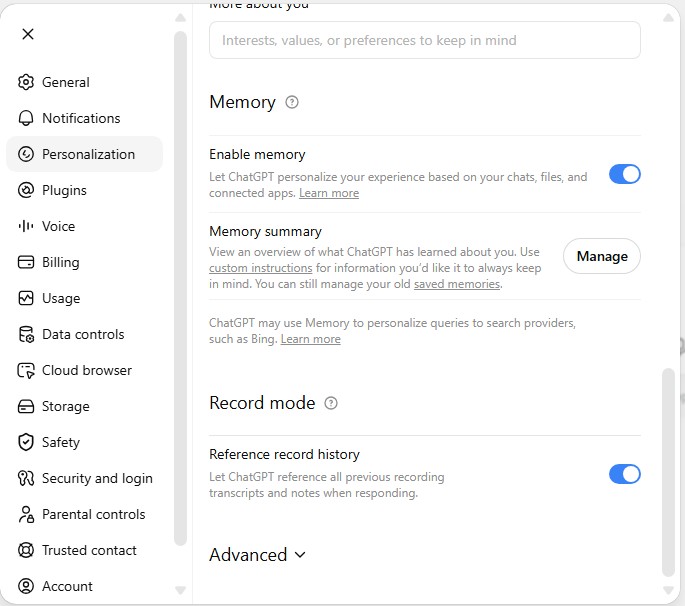
Why Should You Use ChatGPT Memory?
The biggest advantage of ChatGPT Memory is that it saves time. You don’t have to repeat the same background information every time you start a new chat. Once ChatGPT understands your preferences or ongoing projects, it can provide more relevant answers from the beginning.
To get the best results, keep your saved memories up to date. Remove information you no longer need and save only details that will be useful across future conversations. A small collection of relevant memories usually works better than saving everything.
Saved Memories vs Chat History
A common misconception is that ChatGPT remembers every conversation forever. That’s not how it works.
ChatGPT uses Saved Memories and Chat History differently. Knowing the difference helps you decide what should be remembered and what should stay in the current conversation.
Saved Memories
- Stores information you choose to save
- Best for long term preferences and goals
- You can review, edit, or delete it
- Stays until you remove it
Chat History
- Uses relevant context from previous conversations
- Best for recent conversation context
- Changes over time
- Doesn't permanently remember every conversation
A simple way to think about it is this:
- Saved Memories are for information you’ll use again, such as your writing style or learning goals.
- Chat History helps ChatGPT understand the context of recent conversations, but it isn’t meant to store everything permanently.
For example, asking ChatGPT to always explain topics in simple English is a good memory to save. Brainstorming ideas for a project belongs in that conversation and usually doesn’t need to become a saved memory.
How to Ask ChatGPT to Remember Something
You don’t need a special command to save a memory. Just ask ChatGPT naturally.
For example:
- “Remember that I prefer simple English.”
- “Remember that I’m learning Python.”
- “Remember that I write blog posts for beginners.”
These are good memories because they’ll be useful in future conversations.
Avoid saving temporary information like: “Remember that I’m writing a report due tomorrow.”
Instead, save information you’ll probably need again in the coming months.
Write Better Memories
The more specific your memory is, the more helpful ChatGPT can be.
Too vague: “I have a blog.”
Better: “Remember that I write beginner friendly AI tutorials for a US audience.”
A simple rule is to save long term preferences and goals, not temporary tasks or one time information.
What Should You Ask ChatGPT to Remember?
Save information that will help ChatGPT give you better answers in future conversations. Good memories are usually things that don’t change often.
Your Preferences
Tell ChatGPT how you like to receive responses, for example:
Explain topics in simple English.
Keep answers concise.
Use step by step instructions.
Include practical examples.
Your Long Term Projects
Save projects you’ll be working on for weeks or months, such as:
Building a website
Learning a programming language
Preparing for interviews
Writing a book
Your Goals
ChatGPT can give more relevant suggestions if it knows your long term goals, such as:
Learning data analysis
Improving English
Growing an online business
Preparing for certification exams
Your Working Style
If you have a preferred way of working, ask ChatGPT to remember it.
For example:
Give practical advice.
Use Markdown formatting.
Break complex tasks into smaller steps.
What Shouldn’t Be Saved?
Don’t use ChatGPT Memory for temporary information that won’t be useful later.
Examples include:
- Today’s meeting
- This week’s assignment
- Shopping lists
- Temporary deadlines
- One time travel plans
Save only information you’ll use again in future conversations. Everything else is better kept in the current cha
How to Check, Update, or Delete ChatGPT Memories
Your preferences and goals may change over time, so it’s a good idea to review your saved memories occasionally.
How to Check Your Memories
You can check what ChatGPT remembers in two ways:
- Ask ChatGPT, “What do you remember about me?”
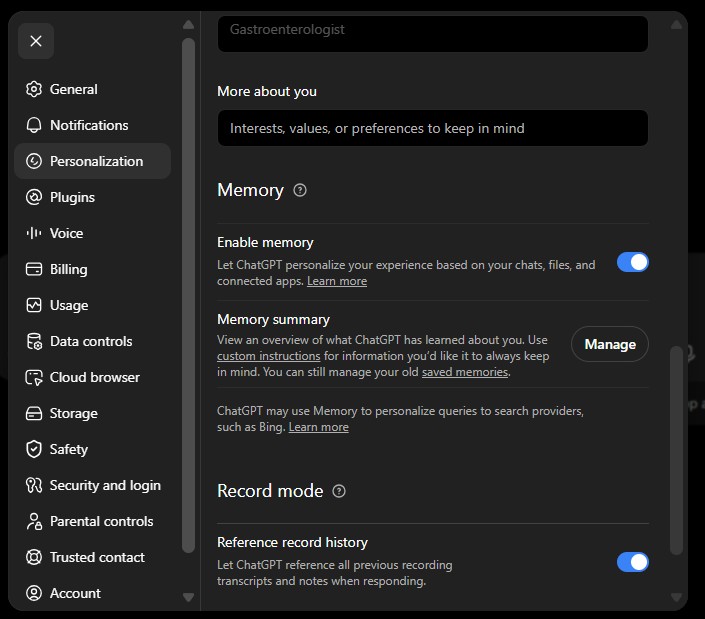
- Go to Settings → Personalization → Manage Memory to view all your saved memories.
How to Update a Memory
If something changes, simply ask ChatGPT to remember the new information.
For example:
- “Remember that I’m learning JavaScript instead of Python.”
- “Remember that I prefer detailed explanations.”
There’s no need to delete everything. Just update what has changed.
How to Delete a Memory
You can delete individual memories or clear all saved memories from the Manage Memory page.
Keep in mind that deleting a conversation doesn’t always remove its saved memory. If you want to remove remembered information completely, delete it from your Memory settings as well.
When Should You Use Temporary Chat?
Use Temporary Chat when you don’t want ChatGPT to save or use memories from a conversation.
It’s useful for:
- Researching sensitive topics
- Testing prompts
- Working with someone else’s information
- Asking one time questions
If a conversation doesn’t need to be remembered later, Temporary Chat is usually the better choice.
Use Memory When..
- Your preferences may evolve over time
- You want ChatGPT to remember long-term context.
- You’re working on ongoing goals or projects.
- You want less repetitive prompting
Use Custom Instructions When…
- You want permanent instructions for every response.
- You always want a specific writing or response style.
- You have rules that rarely change. You want consistent formatting in every conversation
7 Tips to Get the Most Out of ChatGPT Memory
Once you’ve enabled Memory, a few simple habits can make a big difference in the quality of ChatGPT’s responses.
1. Save Only Long-Term Information
Before asking ChatGPT to remember something, ask yourself:
“Will this still be useful a few months from now?”
If the answer is no, keep it within the current conversation instead of saving it as a memory.
2. Be Specific
Instead of saying:
“I have a blog.”
Try:
“Remember that I write beginner-friendly AI tutorials for a US audience.”
Specific memories give ChatGPT much better context.
3. Review Your Memories Regularly
As your goals change, your saved memories should change too.
Take a few minutes every few months to remove outdated information and update preferences that no longer reflect how you work.
4. Don’t Use Memory as a Notebook
Memory isn’t designed to store daily tasks, meeting notes, or shopping lists.
Use it for information that improves future conversations—not temporary reminders.
5. Combine Memory with Good Prompts
Even if ChatGPT remembers your preferences, clear prompts still matter.
Memory provides context, but your prompt tells ChatGPT what you want to accomplish right now.
6. Use Temporary Chat When Appropriate
If you’re discussing sensitive information, testing prompts, or helping someone else, consider using Temporary Chat instead of adding unnecessary memories.
7. Keep Your Memories Simple
You don’t need dozens of saved memories.
A small collection of useful preferences and long-term goals is usually enough to personalize your conversations effectively.
Common Mistakes to Avoid
Many new users make the same mistakes when they first start using ChatGPT Memory.
Here are the most common ones:
- Saving temporary information that quickly becomes outdated.
- Assuming ChatGPT remembers every conversation forever.
- Never reviewing or updating saved memories.
- Confusing Memory with Custom Instructions.
- Filling Memory with unnecessary details instead of useful preferences.
Avoiding these mistakes will help you get more consistent and relevant responses over time.
Frequently Asked Questions
Does ChatGPT remember every conversation?
Can I see what ChatGPT remembers?
Can I delete individual memories?
Is ChatGPT Memory available for everyone?
Final Verdict: ChatGPT Memory is a simple feature that can make a big difference in your daily workflow. By remembering your long-term preferences and goals, it helps you spend less time repeating yourself and more time getting useful answers.
For the best experience, save only information you’ll use repeatedly, review your memories occasionally, and use Temporary Chat for one-time or sensitive conversations. Used thoughtfully, ChatGPT Memory becomes a practical assistant that improves every future chat.
Related Articles
10 Practical Ways to Save Claude Tokens (Without Sacrificing Response Quality) – HustleAI Lab
https://hustleailab.com/chatgpt-review-2026/
MarkItDown Guide: Best Way to Convert Documents into AI-Friendly Markdown