
Large documents often contain far more formatting than AI actually needs. MarkItDown converts them into clean Markdown, making them easier to use with ChatGPT, Claude, Cursor, and other AI tools. Here’s how it works and when it’s worth using.
Introduction:
Uploading a PDF directly into ChatGPT or Claude feels like the obvious thing to do. Most of the time, it even works. But after working with larger reports, technical documentation, and research papers, I started noticing the same pattern: the AI spent time dealing with formatting that had nothing to do with the question I was asking.
The solution wasn’t a better prompt, it was better input.
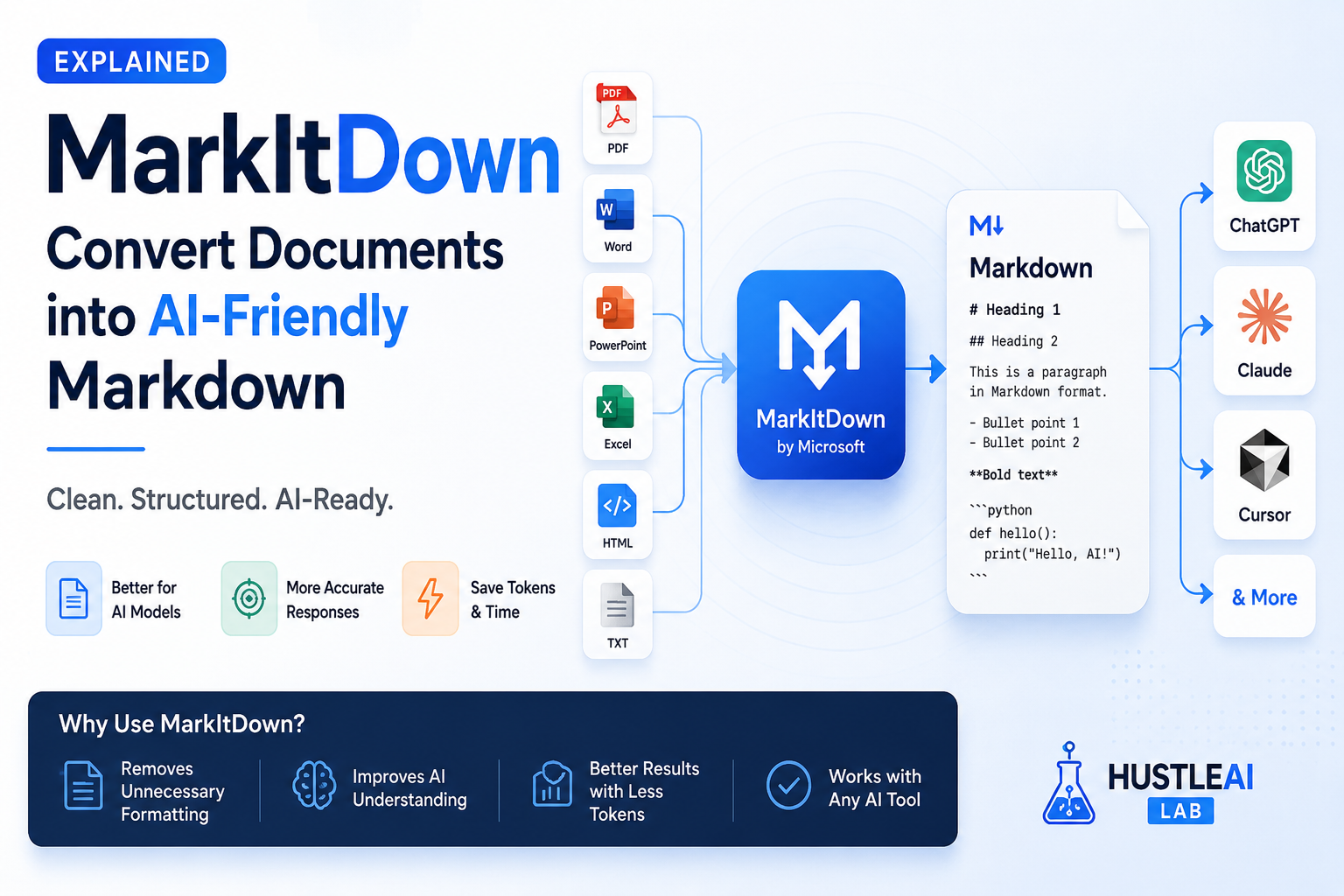
That’s where MarkItDown comes in. Instead of sending raw PDFs, Word documents, or presentations to an AI model, it converts them into clean Markdown that’s easier to read and work with. In this guide, you’ll learn how MarkItDown works, how to set it up, how it fits into ChatGPT, Claude, Cursor, and MCP workflows, and the situations where it’s genuinely useful. as well as the cases where uploading the original document is still the better choice.
What Is MarkItDown?
MarkItDown is a free, open-source tool from Microsoft that converts documents into clean Markdown. It supports PDFs, Word documents, PowerPoint presentations, Excel files, HTML, and several other formats.
So why does that matter?
Instead of sending a document filled with formatting, page numbers, and layout information to an AI model, you can send a cleaner version that focuses on the actual content. This makes it easier to review, summarize, or work with documents in tools like ChatGPT, Claude, and Cursor.
Why Markdown Works Better
AI models are trained to understand structured text. Markdown keeps headings, lists, tables, and code blocks while removing unnecessary formatting that often exists in PDFs and Office documents.
The result is cleaner input for the AI. Instead of interpreting page layouts or decorative elements, the model can focus on the information you’re actually asking about.
It’s important to note that Microsoft doesn’t claim MarkItDown reduces token usage by a specific percentage. Its primary goal is to produce AI-friendly Markdown that preserves meaningful document structure.
Supported File Types
One of the biggest advantages of MarkItDown is its wide format support. You don’t need a different converter for every document type.
It currently supports:
- Microsoft Word (.docx)
- PowerPoint (.pptx)
- Excel (.xlsx)
- HTML
- CSV
- JSON
- XML
- ZIP archives
- EPUB
- Images (with OCR support)
- Audio files (with optional transcription support)
Because it’s open source, new formats and improvements are added regularly.
Installation
Installing MarkItDown only takes a minute if you already have Python installed.
pip install markitdown[all]
You can also install only the features you need, but the [all] package is the easiest option for most users because it includes support for a wider range of document types.
After installation, verify it by running:
markitdown –help
If you see the available commands, you’re ready to start converting documents.
MCP Integration
If you use AI coding assistants or automation tools that support the Model Context Protocol (MCP), MarkItDown can become part of your document pipeline.
Instead of manually converting every file, an MCP workflow can automatically prepare supported documents before they’re passed to an AI model.
This helps create a more consistent workflow when building AI agents, document automation, or retrieval systems.
For most everyday users, MCP is optional. You can still benefit from MarkItDown without using any automation.
ChatGPT Workflow
If you’re using ChatGPT to summarize reports, analyze documents, or extract information, convert the document first.
A simple workflow looks like this:
Document → MarkItDown → Markdown → ChatGPT
Instead of working with a heavily formatted file, ChatGPT receives clean, structured text that’s easier to review and reference during the conversation.
This approach is especially useful for long reports, technical documentation, and meeting notes.
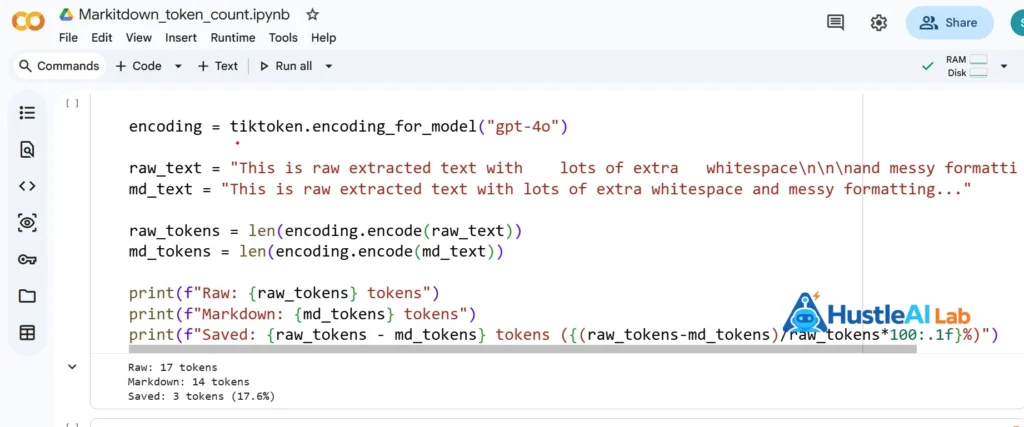
Original vs markitdown tokens comparison
💡 HAL Tip: Markdown also makes it easier to reuse the same document across different AI tools without creating separate versions.
MCP Integration
If you use AI coding assistants or automation tools that support the Model Context Protocol (MCP), MarkItDown can become part of your document pipeline.
Instead of manually converting every file, an MCP workflow can automatically prepare supported documents before they’re passed to an AI model.
This helps create a more consistent workflow when building AI agents, document automation, or retrieval systems.
For most everyday users, MCP is optional. You can still benefit from MarkItDown without using any automation.
Best Practices
You’ll get the best results when MarkItDown is part of your document workflow rather than a one-time converter.
Here are a few practical tips:
- Convert documents before uploading them to an AI assistant.
- Review the generated Markdown for tables or images that may need manual checking.
- Keep the original file as your source of truth.
- Use Markdown when you plan to reuse the same document across multiple AI tools.
- Update MarkItDown regularly to benefit from new format support and improvements.
HAL Insight
MarkItDown isn't necessary for every document. But if you frequently work with reports, manuals, research papers, or technical documentation, it's a useful tool to have in your AI toolkit.
Strengths and Limitations
What I Loved
- Supports a wide range of file formats, including PDF, DOCX, PPTX, XLSX, and HTML.
- Converts documents into clean Markdown that's easy to review and edit.
- Free and open source.
- Works locally, so you don't have to upload documents to another conversion service.
Things to Keep in Mind
- It's designed for AI workflows, not for recreating documents with their original layout.
- Complex tables, charts, and graphics may need manual review after conversion.
- Always review the generated Markdown before using it with important documents.
- Complex tables, charts, and graphics may need manual review after conversion.
Is It Worth Using?
If you occasionally ask ChatGPT to summarize a PDF, you probably don’t need to add another step to your workflow.
However, if you regularly work with reports, technical documentation, research papers, or large document collections, MarkItDown is worth trying. It creates clean, AI-friendly Markdown that can make documents easier to review, reuse, and share across different AI tools.
The best part is that it’s free, open source, and takes only a few minutes to set up. Even if you decide it isn’t the right fit for every project, it’s a useful tool to have whenever you’re working with document-heavy AI workflows.